
Surf it. Save it. Relive it.
Surf tracking for
Apple Watch.
Surf Tracking records your GPS route and automatically detects rides on Apple Watch. Review your surf session maps, wave counts, ride speed and distance on iPhone.
Coming soon to theApp Store- Automatic ride detection
- GPS maps of your sessions
- Ride-by-ride stats
- Apple Health insights
Surf Tracking at a glance
- Record on Apple Watch
- Track your GPS route and rides without carrying your iPhone into the water.
- Review on iPhone
- Explore satellite maps, ride-by-ride stats, session charts and Apple Health insights.
- Device requirements
- iPhone with iOS 17.5 or later and Apple Watch with watchOS 10.6 or later.
- App Store availability
- Coming soon to the App Store. Planned pricing: free session recording with an optional Surf Tracking Pro subscription.
Record surf sessions
on Apple Watch.
Your session, right on your wrist. A clear display and Digital Crown controls help you spend less time managing your watch and more time watching the waves.
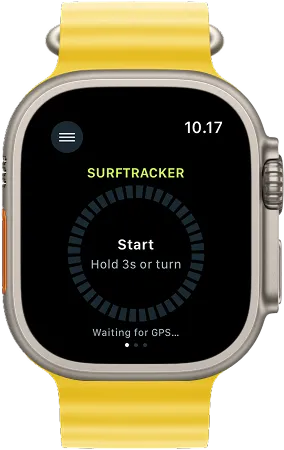
- Start with a turn. Turn the Digital Crown to start recording. After your session, unlock Water Lock with the Crown, then turn to stop.
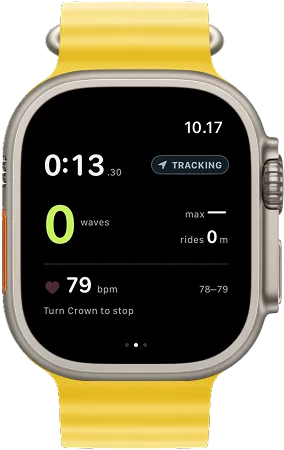
- One glance. Your key stats. Wave count, elapsed time, best ride speed, ride distance and heart rate together on one screen.
- Let your watch do the tracking. Automatic ride detection records your rides while you focus on the next wave.
Your surf sessions,
mapped with GPS.
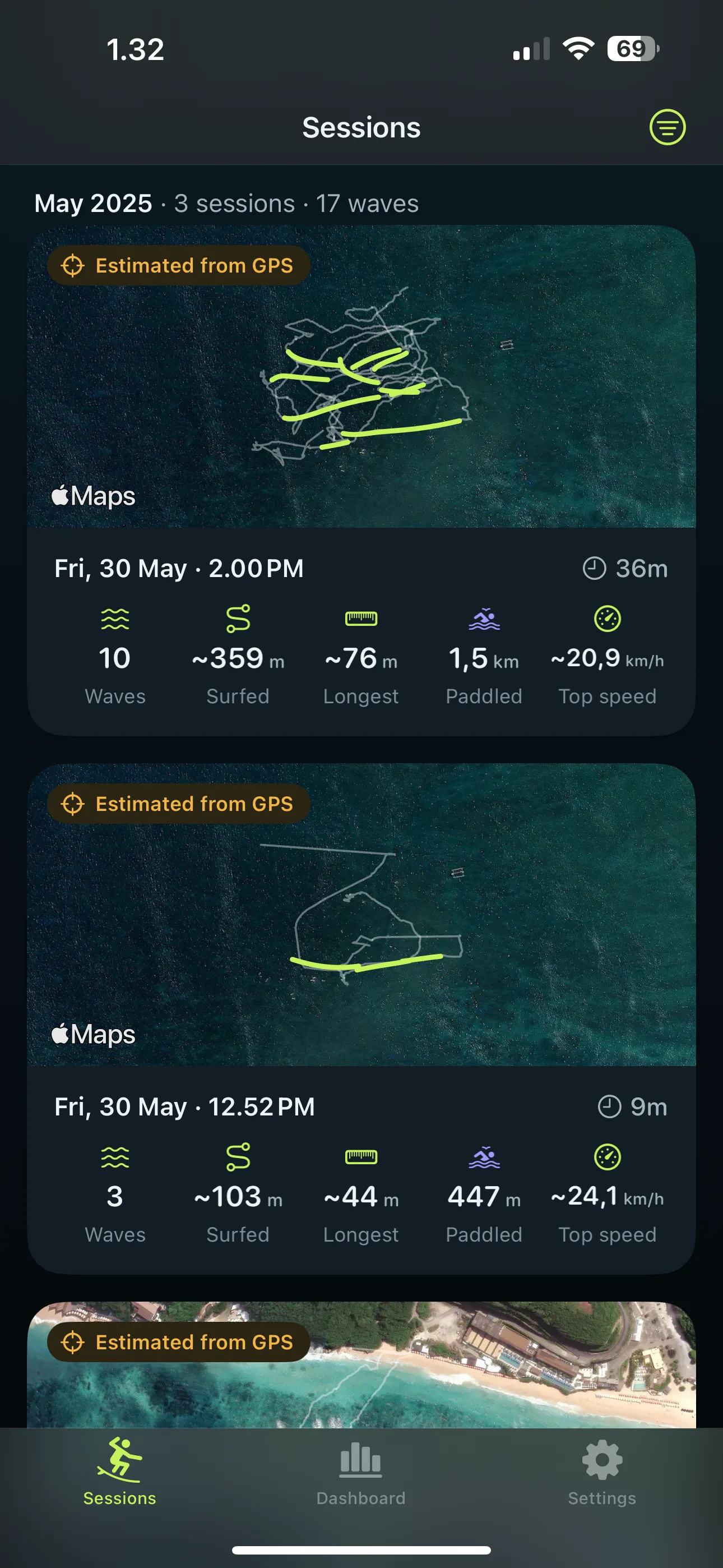
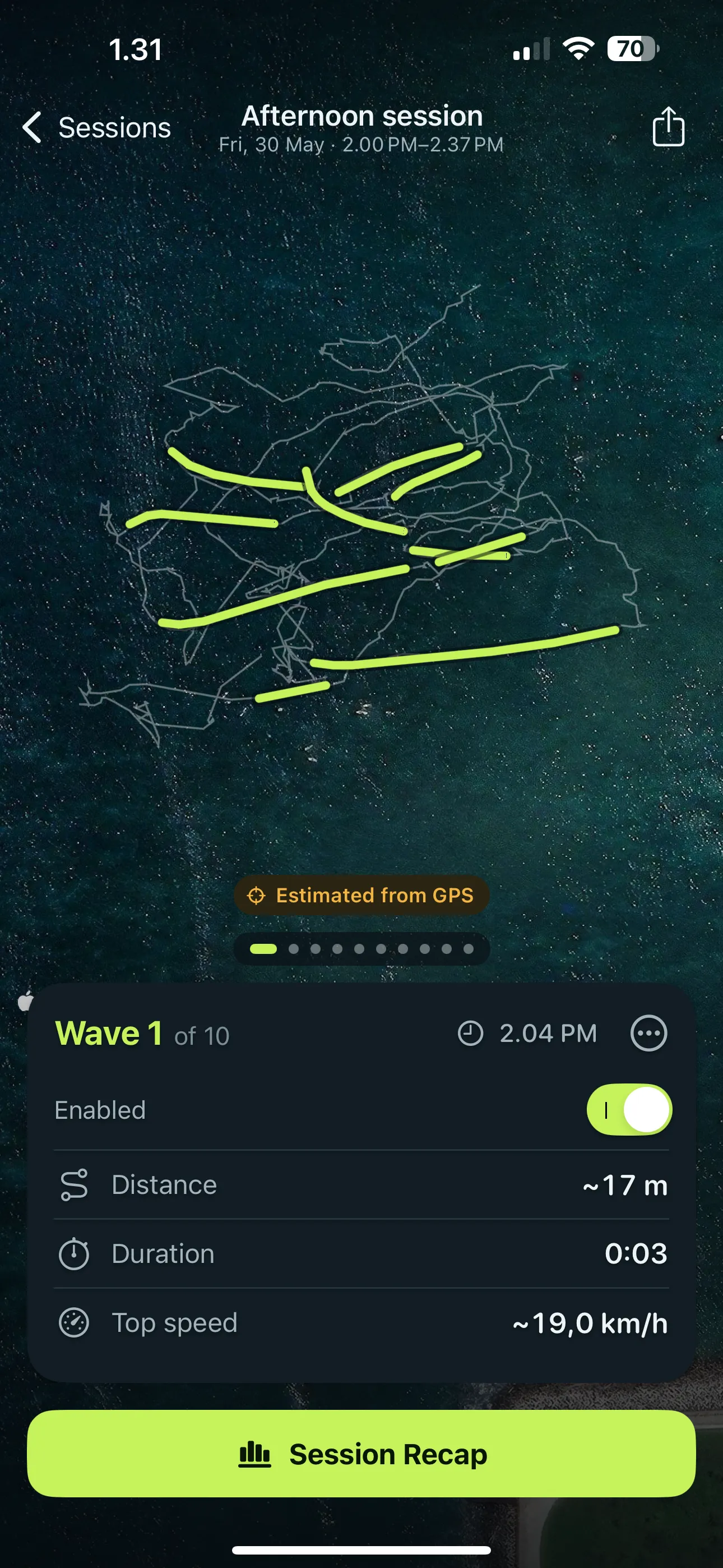
Keep a visual record of your time in the water. Explore your GPS track on a satellite map, with rides highlighted and the session’s key stats ready to revisit.
Ride-by-ride stats.
Your waves in detail.
That long ride. That burst of speed. Find them again on the map. Swipe through your recorded rides, check their distance, duration and top speed, and exclude detections that weren’t waves.
Your session recap.
Waves, speed, distance.
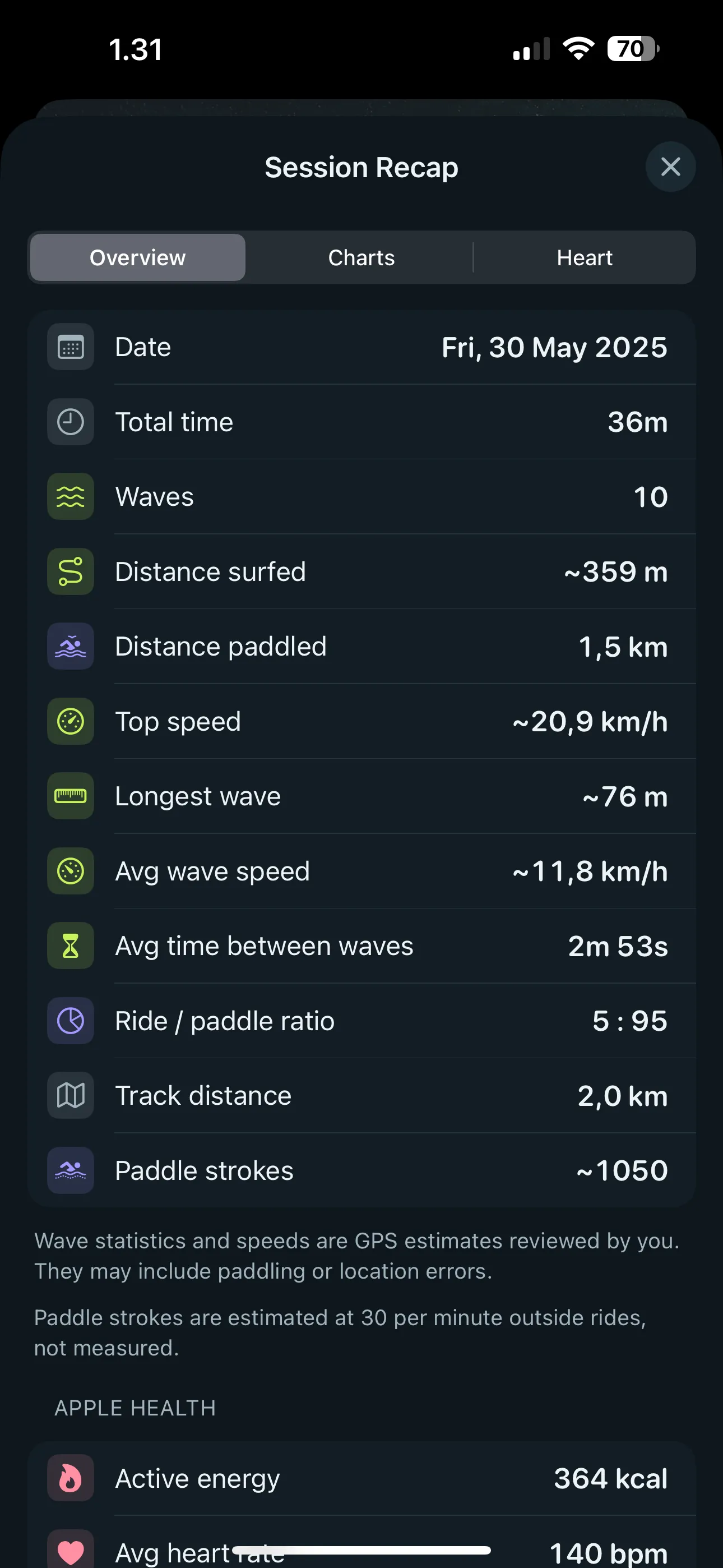
How many waves you caught. How far you rode. How much you paddled. Get your session’s highlights in one recap, including your longest ride, top speed and average time between waves.
- waves
- 10
- surfed
- ~359m
- paddled
- 1.5km
- between waves
- 2m 53s
Example session from the app screenshot. Numbers estimated from GPS carry a ~, so you know which values to read loosely.
Surf session charts.
Find your rhythm.
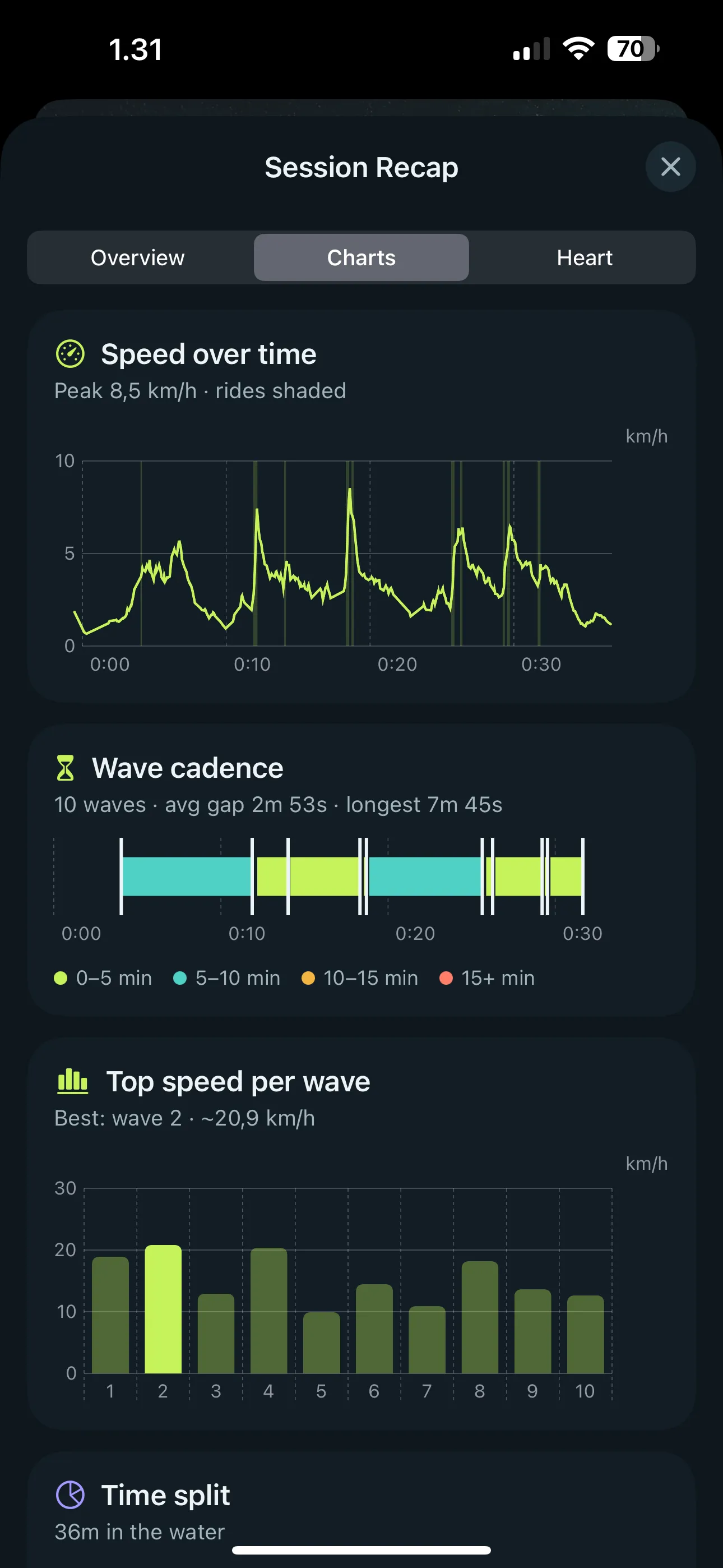
See the bursts of speed, the gaps between rides and how your time split between riding, paddling and waiting. Compare top speeds across your waves and pick out the moments worth another look.
Apple Health insights.
The effort behind the waves.
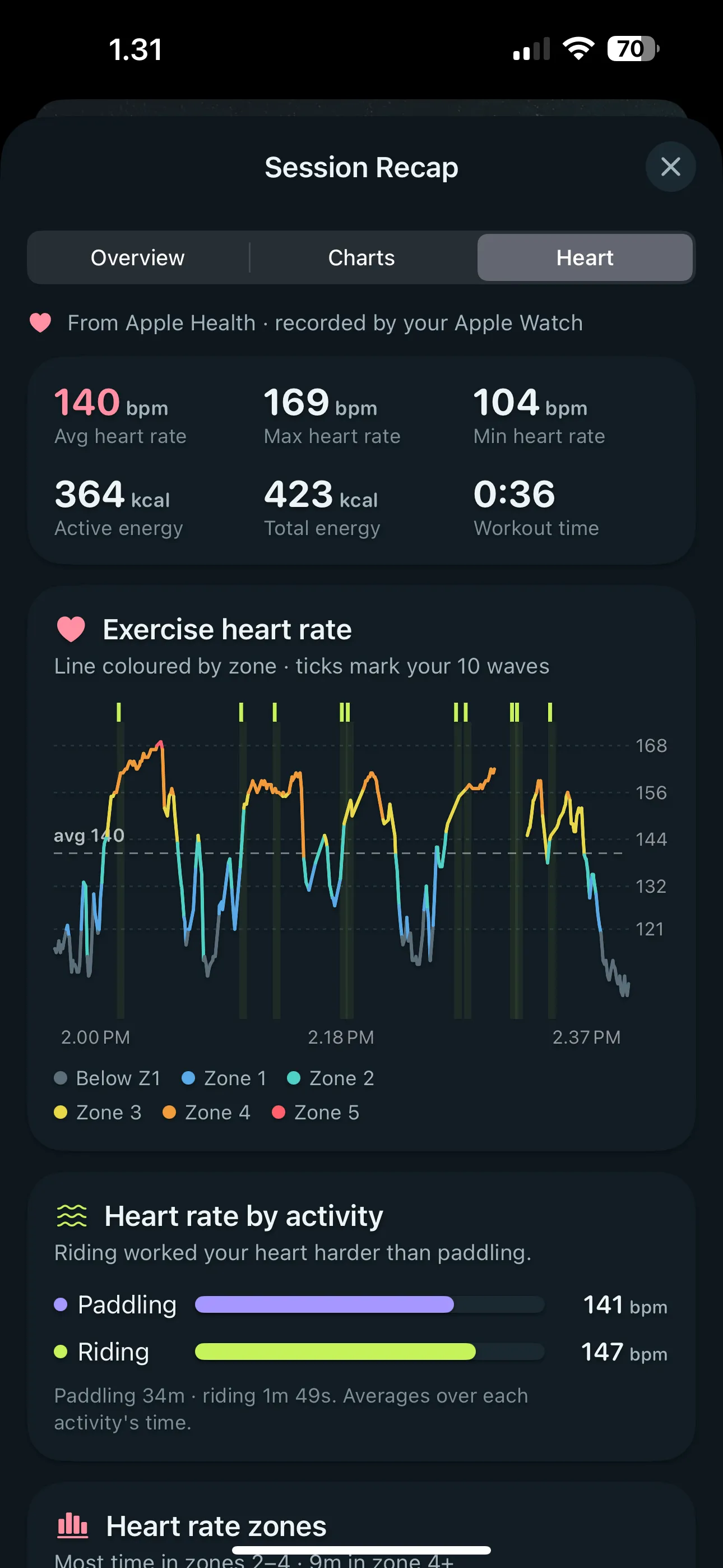
Bring your Apple Health data into the story. Explore heart rate throughout your session, time in heart rate zones and active calories. See how your effort changed as you paddled, waited and rode.
Your surf history.
See your progress.
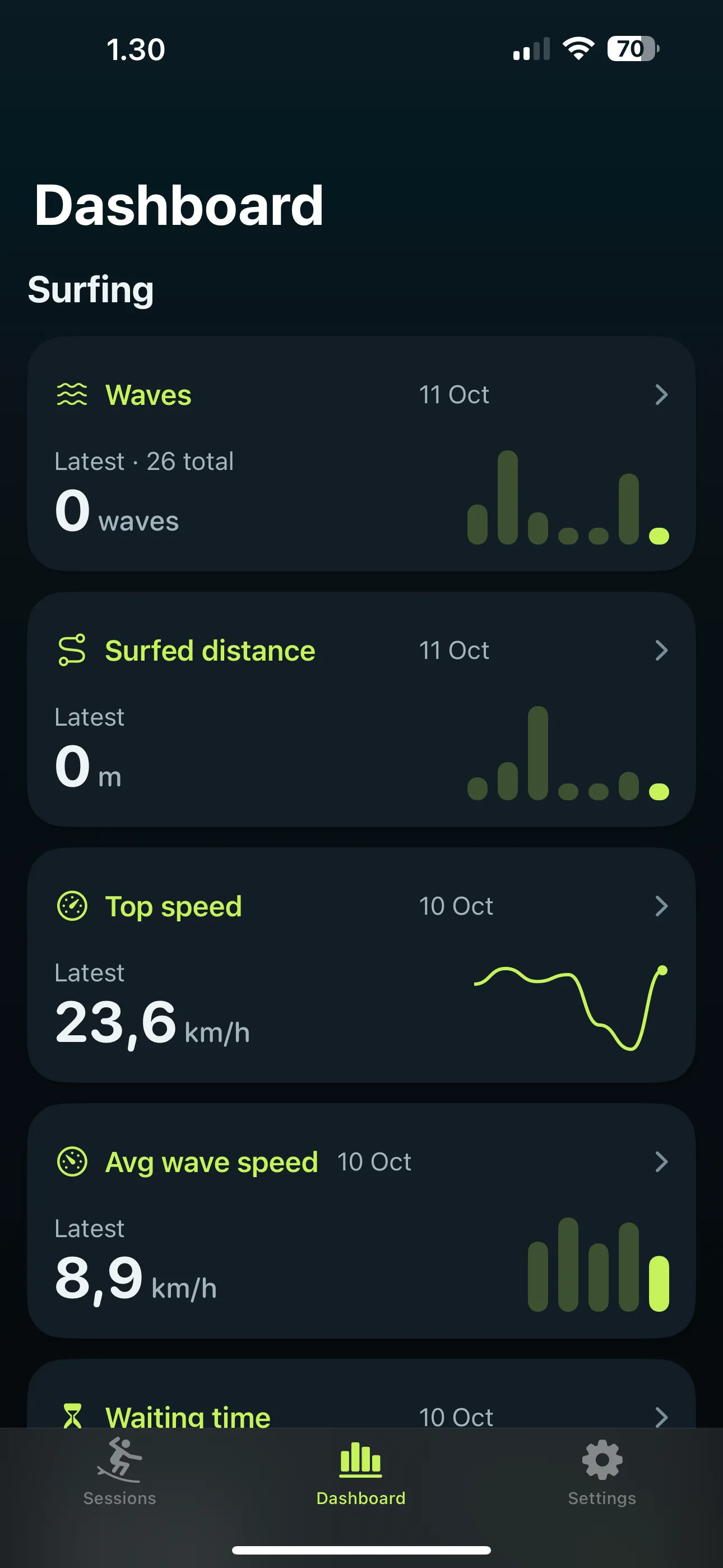
One session is a snapshot. Your history tells a bigger story. Compare wave counts, surfed distance and speeds over time, revisit your best days and spot changes from session to session.
Share a session worth remembering.
Create a shareable image with your session map and key stats. Send it to your surf crew or keep it as a reminder of a good day.
Take your tracks with you.
Export GPS tracks as GPX files for your own archive or compatible mapping tools.
From wrist to recap.
Record on Apple Watch, then review synced sessions on the larger screen of your iPhone.
Your stats. Your units.
Choose metric or imperial units for speeds and distances.
Surf Tracking FAQ
What is Surf Tracking?
Surf Tracking is a surf session tracker for Apple Watch and iPhone. It records your GPS route and automatically detects rides on Apple Watch, then lets you review session maps, wave counts, ride speed and distance, and Apple Health insights on iPhone.
Which iPhone and Apple Watch do I need for Surf Tracking?
Surf Tracking requires an iPhone with iOS 17.5 or later and an Apple Watch with watchOS 10.6 or later. Record sessions on Apple Watch and review them on your iPhone.
Can I track a surf session without my iPhone in the water?
Yes. Surf Tracking records the session on Apple Watch without your iPhone nearby. The watch sends the recorded session to your iPhone when the devices are back in range.
How does Surf Tracking detect waves automatically?
Surf Tracking looks for stretches where you move faster than paddling speed for long enough to be a ride. You can adjust the minimum speed and duration in Settings, then switch off any detection that was not a wave to update your session totals.
How accurate are the surf speed and distance measurements?
Surf Tracking estimates speed and distance from Apple Watch GPS. GPS is less precise on the water than on land, so these measurements are estimates. Values estimated from GPS are marked with ~ in the app.
Which Apple Health insights can I see in Surf Tracking?
Surf Tracking uses heart rate and energy recorded during your surf workout to show heart-rate charts, time in heart-rate zones and active calories in the session recap. Health data is never sold or used for advertising.
Can I export my surf session as a GPX file?
Yes. Surf Tracking can export session GPS tracks as GPX files for your own archive or compatible mapping tools. You can also create a shareable image of your session map and key stats.
Is Surf Tracking available on the App Store?
Surf Tracking is coming soon to the App Store. A download link will appear on this website when the app is available.
Is Surf Tracking free, and what is Surf Tracking Pro?
When available, Surf Tracking will be free to download and to record sessions. Surf Tracking Pro is an optional subscription that unlocks extra stats. You can manage or cancel it in your Apple Account settings.
Give your next session
a story to come back to.
Surf Tracking is coming soon to the App Store. Keep the route, revisit the rides and build a history of your days in the water.
Coming soon to theApp Store